AI Card Grading: How It Works, Uses & Limits
Learn how AI card grading reviews visible condition, how to capture useful photos, when to pre-screen, and when professional grading still matters.

Loading...
Learn how AI card grading reviews visible condition, how to capture useful photos, when to pre-screen, and when professional grading still matters.
AI card grading uses photographs to estimate visible card condition. It can help a collector review centering, corners, edges, and surface in a consistent format, then decide which cards deserve a closer in-hand inspection or consideration for professional grading.
That is the useful definition. AI grading is not the same as mailing a card to PSA, BGS, CGC, SGC, or another physical grading company. A photo-based result does not authenticate the card, assign an official company grade, encapsulate it, appraise it, or guarantee what a buyer will pay. It also cannot examine a defect that the supplied images fail to reveal.
The practical role is pre-screening. Instead of treating every card in a stack as an equal submission candidate, you can use the same capture process and condition categories for each one. Then you inspect the strongest candidates by hand, check current grading-company rules and completed sales, and make a card-specific decision.
If your main question is whether AI grading should be trusted, use the AI card grading trust checklist. For a focused discussion of accuracy claims and image limits, read how accurate AI card grading can be. For the narrower technical workflow, the CGI/CGC distinction, and first-party notes on AI-assisted physical grading, read how AI card grading technology works. This guide focuses on what the workflow does, how to use it, and where its limits begin.
In normal collector language, “AI grading” is shorthand for a structured condition estimate created from card images. The process can include these general steps:
The system does not need to “know” the card the way its owner does to support this workflow. Its job is narrower: evaluate the visual evidence in the supplied photos and make that evidence easier to review. The final decision remains with the collector, and the official decision remains with the professional grading company.
For help reading an output without overinterpreting it, see what your AI card grade means.
Centering, corners, edges, and surface are useful inspection categories because they give collectors a repeatable checklist. They are not a promise that every professional company weighs every detail identically.
Centering describes how the printed design sits within the visible card boundaries. On a card with clear borders, compare left with right and top with bottom. A straight, uncropped photo is important: camera tilt and perspective can make one border appear wider than it is.
Use the card centering tool when you want a focused geometry check. Then compare the result with the current published standard of the grading company you may use. Do not assume one ratio automatically produces one grade; eye appeal, card design, reverse centering, and other defects still matter.
Review all four corners on the front and back for whitening, softness, bends, fraying, chips, and missing material. A full-card image may show an obvious damaged corner but miss a small spot of wear. Zooming a blurry photo does not create detail that the camera failed to capture.
When a corner could decide whether you submit, recapture it closely or use Forensic Capture for a more detailed corner workflow. A closer image can reveal more, but the physical card remains the reference.
Follow the full perimeter rather than checking only the most visible side. Dark borders can make whitening obvious; light borders may conceal it. Look for chips, rough cuts, dents, peeling, fraying, and color loss on both faces.
An edge may also look different depending on focus and contrast. Use the edge and surface grading guide to perform a deliberate manual check instead of relying only on the overall estimate.
Surface is where a flat photo reaches its clearest limit. Scratches, dents, indentations, print lines, residue, gloss changes, creases, stains, and texture issues may appear only when the card moves under light. Foil, chrome, holographic, acetate, and textured cards can create reflections that hide defects or imitate them.
Keep one straight-on image for the AI pre-screen, then tilt the physical card under soft directional light. If a possible defect changes with the angle, give the in-hand observation more weight than the flat image.
Image quality is part of the evidence, not a cosmetic detail. Use the same capture routine for every card so differences between results are more likely to reflect the cards rather than the photography.
A sleeve, top loader, one-touch, or slab can add its own scratches, dust, glare, and boundaries. Photograph the bare card only when removing it is safe. If the card should remain protected, keep it protected and treat the result as a limited through-holder screen.
Reflective cards deserve extra care. Diffuse the light, prevent the phone or your hands from reflecting across the card, and inspect the physical surface from more than one angle after the straight-on capture. A clean-looking photo is not proof of a clean surface.
The safest workflow separates capture, estimate, verification, and submission decisions.
Our pre-screening guide for professional submissions expands the last three steps. If you are still choosing a service, compare the current options in the card grading companies guide and the broader how to get cards graded guide.
| Limitation | What can happen | Safer response |
|---|---|---|
| Cropped card | A corner or edge is missing from the evidence | Recapture the entire card |
| Soft focus | Whitening, chips, and scratches lose definition | Stabilize the phone and confirm focus |
| Camera angle | Borders and card shape appear distorted | Keep the lens parallel to the card |
| Glare or shadow | A defect is hidden or a reflection resembles damage | Use soft, even light and inspect in hand |
| Sleeve or holder | Plastic wear is confused with card wear | Remove only when safe, otherwise qualify the result |
| Compression or edited images | Fine details are lost or changed | Use an original, unfiltered image |
| Hidden physical issue | Dents, stock, texture, or alterations are not visible | Use in-hand and professional examination |
| Company-specific standard | An estimate and final company grade differ | Read the current standard and avoid guarantees |
Two different image sets can produce different estimates because they show different evidence. If that happens, do not keep the higher result and discard the lower one. Compare the photos, identify the changed crop, light, angle, or focus, recapture consistently, and inspect the physical card.
You photograph a modern card front and back with complete borders, sharp focus, and even light. The report identifies balanced centering and no obvious corner or edge concern. Your in-hand surface check also looks clean.
Next step: keep it on the submission shortlist, then compare the current professional fee and completed sales at several plausible grades. The pre-screen supports further consideration; it does not promise the final grade.
The overall estimate looks encouraging, but the corner section identifies whitening on the back. You confirm it on the physical card.
Next step: calculate the submission decision using a conservative outcome, or skip the card if the lower grade would not justify the process. The useful information is the verified defect, not the headline number.
A straight-on photo shows what could be a scratch, but the mark moves when you change the light. A second photo produces a different result.
Next step: do not choose between estimates. Inspect the card under several angles, improve the lighting, and use professional physical grading if the condition decision materially matters.
The card should not be removed casually, and the holder adds glare and surface scratches. The images are useful enough to notice obvious centering and edge concerns but not enough to assess authenticity, stock, alterations, or the complete surface.
Next step: treat the AI result as preliminary only. Seek an experienced in-hand review and a qualified authentication and grading service before making a high-stakes decision.
The seller's images are compressed, angled, and cropped close to the border. A photo-based estimate cannot recover the hidden corners or determine whether editing changed the appearance.
Next step: ask for original front and back images or inspect the card in person. Do not use an AI result as authentication, appraisal, or proof of the seller's condition claim.
AI pre-screening helps answer: Which cards should I inspect more closely or consider submitting? Professional grading helps answer: What does this company conclude after examining the physical card under its own procedures?
A professional service may evaluate authenticity and alterations, view the card under controlled conditions, apply its own standard, issue its official grade, and encapsulate an accepted card. A photo-based tool cannot perform those physical steps.
The two methods can fit the same workflow: capture, pre-screen, inspect, research, and then submit selected cards. Read AI vs human card grading for a detailed comparison of their roles.
Use CardGrade as a structured review tool, not as a substitute for judgment:
CardGrade's result is an image-based estimate. It is not an official PSA, BGS, CGC, SGC, or other professional grade; it does not authenticate the card; and it does not guarantee eligibility, value, a sale price, or a profitable submission.
AI card grading is most useful before the final decision. It turns card photos into a repeatable visible-condition review, helps collectors compare candidates, and points to areas that deserve an in-hand check.
Capture the card carefully, read the categories, verify the physical evidence, and use a professional grader when you need authentication, an official grade, or encapsulation. Pre-screen a card with CardGrade, then decide with the complete picture.
AI card grading is a photo-based estimate of visible card condition. It can organize observations about centering, corners, edges, and surface, but it is not an official grade, physical authentication, appraisal, or guarantee of value.
The system reviews the card images supplied by the collector, identifies visible card boundaries and condition signals, and returns a structured estimate. The result depends on what the photos reveal, so crop, focus, angle, lighting, glare, and holders all matter.
No. A professional grader examines the physical card under its own procedures and can issue an official grade and holder. AI is better treated as a pre-screen that helps collectors decide what deserves closer inspection or a paid submission.
No photo-based condition estimate should be treated as authentication. Counterfeit stock, trimming, recoloring, restoration, hidden alterations, and other physical details can require in-hand review and specialized expertise.
Use a clean, plain background and soft, even light. Keep the camera parallel to the card, show the complete front and back, include every corner and edge, confirm sharp focus, and avoid glare, heavy shadows, filters, and perspective distortion.
Pre-screen your cards before submitting to PSA, BGS, or CGC. Plans from $4.99/mo.
Pre-screen free in 60 secondsAlso available as a Chrome Extension
Grade cards while you browse
Install our free Chrome Extension — right-click any card on eBay, COMC, or TCGPlayer for a grade in ~60 seconds.

Founder, CardGrade
Jamie Budesky is the founder of CardGrade and the engineer behind its AI vision grading pipeline. An Army veteran and IT specialist (DoD, since 2017), he writes about card grading, AI/ML grading technology, and collecting strategy — grounded in CardGrade's own grading data.
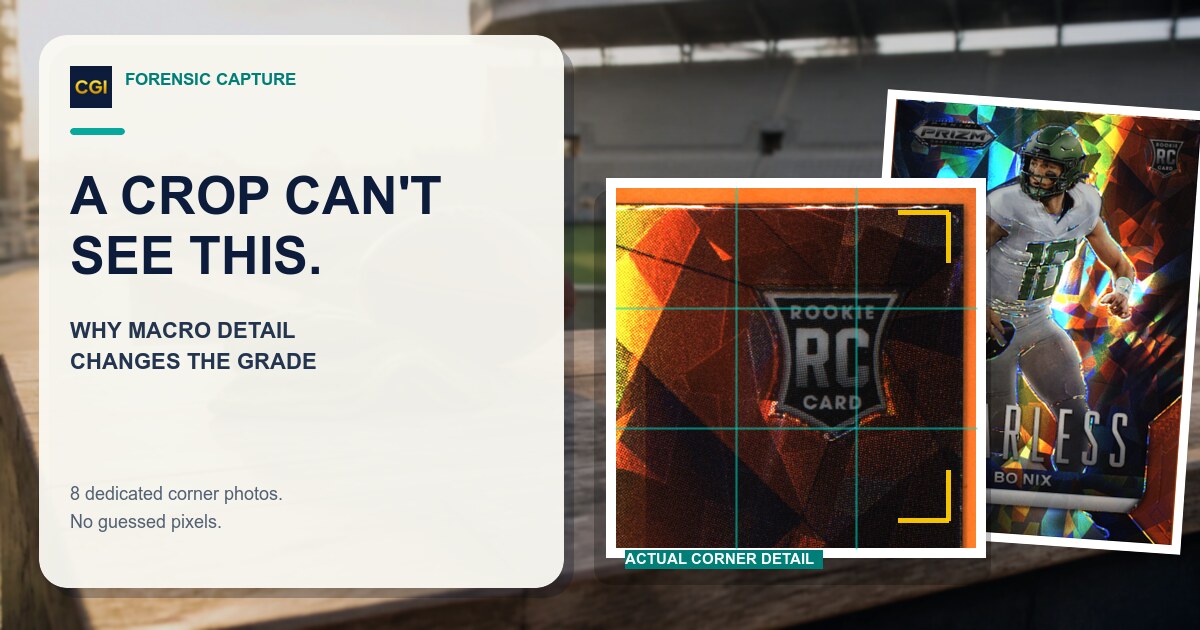
Zooming into one photo cannot recover detail the camera never captured. Why per-corner macro capture changes what AI grading can actually see, and when to use it.

Forensic Capture is CardGrade's premium grade: eight per-corner macros, stitched live, for sharper whitening, fraying, and edge-wear detection.
A sleeve, top loader, one-touch, or slab can add glare, scratches, dust, and false edges. A bare-card image is usually more useful, but do not remove a card when handling it would create unnecessary risk. Treat a through-holder result as more limited.
Different photos contain different visual evidence. One angle may hide a scratch, glare may resemble whitening, a crop may remove an edge, or soft focus may blur a corner. Recapture the card consistently and inspect it in hand instead of selecting the preferred estimate.
Read the category findings, verify each visible concern against the physical card, inspect the surface under changing light, check current professional-grading requirements, and compare recent completed sales at several plausible grades before deciding whether to submit.
Use a card grading app to pre-screen visible condition before you pay to submit. CardGrade runs on iPhone, Android, and desktop web—PSA, BGS, and CGC estimates in ~60 seconds.